 Tiny Desk AI
YOUR OWN FRONT-ROW SESSION
Tiny Desk AI
Turn one photo into an intimate live music moment.
Close mic. Warm light. All the feeling.
Portrait to performance One-time payment No subscription
SESSION STUDIOBETA
Your session setup
01 / YOUR PERFORMER
Drop one portrait hereor browse from your deviceJPG, PNG or WEBP · Up to 12 MB
02 / FORMAT & RESOLUTION9:16 · 480p · 10 CR
SELECT VIDEO PACK10 credits / video (480p)
480p = 10 credits · 720p = 15 credits · Credits valid 180 days
One-time payment Credit returned on failure
Preview 9:16
See an example SAMPLE VIDEOTINY DESK AIPORTRAIT TO PERFORMANCE
9:16
FROM OUR 15-SECOND SAMPLE VIDEO
See a Tiny Desk AI video, frame by frame
Four moments from the Tiny Desk AI sample: a close room, a band in motion, a lead performer, and a saxophone solo.
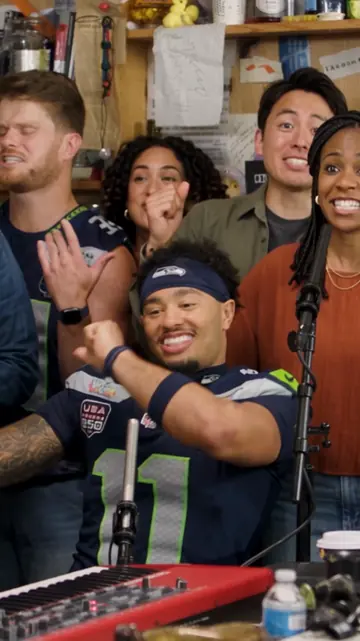
The room comes alive
A small-room performance with the band and keyboard in view.
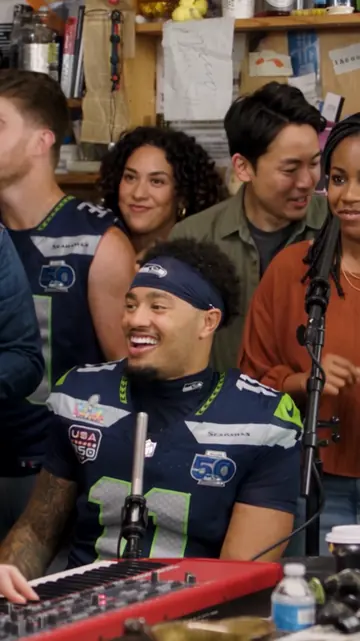
A moment between the notes
The musicians share a spontaneous reaction during the set.
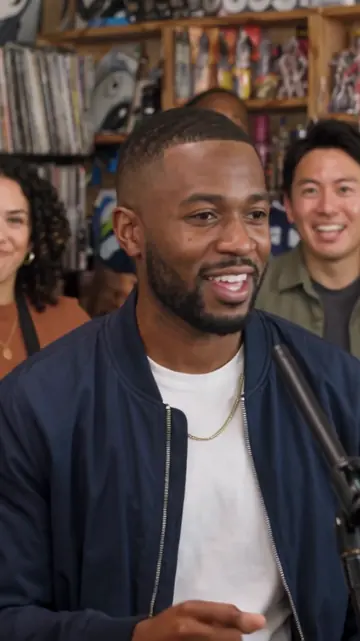
The lead takes focus
A close camera angle brings the lead performer into focus.
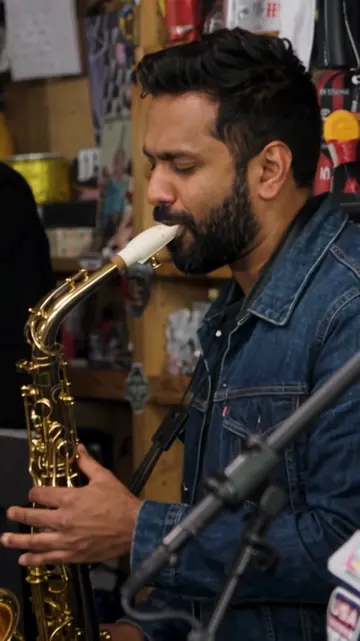
A solo fills the room
A saxophone solo adds another angle to the intimate set.
A PERSONAL AI PERFORMANCE VIDEO
Create a Tiny Desk AI video from one photo
A Tiny Desk AI video turns a portrait into an intimate, desk-concert-inspired performance clip. Choose a vertical 9:16 resolution and a one-time video pack for your clip.
Start with a clear photo of the performer, then choose 480p or 720p. Tiny Desk AI is an independent creative tool, not an official NPR production.
START WITHOne portrait
CHOOSE THE FORMATVertical 9:16 · 480p or 720p
SELECT A PACKOne-time video packs from $9.99
A LITTLE STAGE, MADE YOURS
How to make a Tiny Desk AI video
Start with a portrait, choose a resolution, then select a one-time video pack.
Bring a portrait
Choose a clear photo. Your subject becomes the performer.
Choose a resolution
Select 480p or 720p for your vertical clip.
Select a video pack
Choose a one-time pack with the number of clips you need.
A SIMPLE VIDEO SETUP
What do you need to make a Tiny Desk AI video?
Start with one portrait, select the output resolution, and choose a one-time video pack. The studio keeps those choices together before you continue.
Choose the performer photo
Upload one portrait in JPG, PNG, or WEBP format. The studio accepts image files up to 12 MB. A clear, well-lit image with one visible face gives the video a useful visual reference.
Choose a video resolution
Select 480p for a quick preview or 720p for HD detail. Both options use a vertical 9:16 composition, and the credit cost is shown beside each choice.
Select a video pack
Choose a single, trio, or party pack. Each is a one-time purchase, and the studio updates the number of available clips based on your selected resolution.
Select a vertical video resolution
The studio is arranged for a vertical 9:16 composition. Choose 480p for a quick preview or 720p for HD detail, then select a one-time video pack. The credit cost changes with the resolution, and the selected pack shows how many clips it covers before you continue.
A BETTER PHOTO MAKES A BETTER START
Photo tips for an AI Tiny Desk concert
You do not need a professional headshot. A few practical choices can make it easier for an AI video generator to read the person in your image and leave room for the performance scene.
- Keep one face easy to see. Choose a solo portrait where the face is in frame and not hidden by sunglasses, hands, or heavy shadows.
- Use even, natural light. Bright, balanced lighting preserves facial detail and gives the image a clear starting point.
- Leave some space around the subject. A little room above the head and around the shoulders helps the portrait sit naturally in a vertical concert scene.
- Use a portrait you can share. Get permission before using someone else’s image or posting the finished video.
A SMALL STAGE FOR A PERSONAL IDEA
Ideas for your Tiny Desk AI music video
A desk-concert scene can make a familiar portrait feel like a new performance moment. The simple setup is useful when you want a visual idea that feels intimate rather than like a large arena show.
A personal greeting or tribute
Build a personal performance concept around a portrait for a birthday, celebration, or tribute. When the image features somebody else, ask permission before using their likeness or sharing the result.
A vertical idea for social video
The studio uses a 9:16 vertical composition, a familiar layout for short-form social feeds. Choose 480p or 720p, then select the pack that fits the number of clips you need. Check each platform’s rules and any music rights before posting a finished clip.
ABOUT THE VIRAL FORMAT
Looking for the “Outstanding” Tiny Desk AI trend?
Searches for Tiny Desk AI include tutorials and short videos about the “Outstanding” concert trend. That format uses a particular song and references a recognizable performance. The Tiny Desk AI studio on this page is a photo-led creative tool with selectable resolutions and video packs; it does not include an “Outstanding” song preset or official NPR performance footage.
If you are making a trend-inspired edit elsewhere, check that you have the rights to use the song, video, and likenesses involved. Here, you can use a portrait you own or have permission to use and create a separate desk-concert-inspired scene.
GOOD TO KNOW
Tiny Desk AI questions
Answers about making a photo-based performance video, choosing an image, understanding the viral search trend, and using the studio.
What is a Tiny Desk AI video?
A Tiny Desk AI video is a portrait-based AI performance clip with the intimate atmosphere of a small desk concert. This studio lets you start with one photo, select a vertical resolution, and choose a one-time video pack.
How do I make a Tiny Desk AI video?
Open the studio and upload one portrait. Choose 480p or 720p, review the video count and credit cost for each pack, then select a one-time pack to continue.
Which photo should I use?
Use a clear, well-lit portrait with one performer’s face visible. A front-facing image with the face unobstructed gives the AI a more useful reference than a distant, low-light, or crowded photo. JPG, PNG, and WEBP images up to 12 MB are accepted. If the portrait belongs to someone else, get their permission before using it.
Is Tiny Desk AI affiliated with NPR?
No. Tiny Desk AI is an independent creative tool and is not affiliated with or endorsed by NPR, NPR Music, or the official Tiny Desk Concert series. “Tiny Desk” describes the intimate desk-concert atmosphere people search for; this page does not offer official NPR recordings or represent the NPR program.
Can I make the “Outstanding” Tiny Desk trend video?
The studio does not provide an “Outstanding” song preset or use official NPR concert footage. If you are looking for that exact viral edit, this tool is a different starting point: it creates a photo-led, desk-concert-inspired concept. Only use music, video, and images you have permission to use.
How many credits does each video use?
A 480p video uses 10 credits, and a 720p video uses 15 credits. The pack selector recalculates how many videos are available when you change resolution. The 10-credit pack can make one 480p video; select a larger pack for 720p.
What video format and resolution can I choose?
The studio is set up for vertical 9:16 clips, a layout commonly used for short-form video. Choose 480p for a quick preview or 720p for HD detail. The credit amount is shown beside each resolution, and the pack selector updates the number of videos available at that setting.
Is this a subscription?
No. Video packs are one-time purchases rather than recurring subscriptions. The studio shows the price, number of videos, and credits included in each pack before you continue. The displayed starting pack is $9.99. Credits are valid for 180 days from purchase.
What happens if a generation fails?
The studio states that credits are returned when a generation fails. Your selected resolution determines how many credits a video uses, so the pack selector shows the estimated number of videos for that choice. Review the pack details before continuing so the credit count is clear.